> ## Documentation Index
> Fetch the complete documentation index at: https://docsnewgen.flexxible.com/llms.txt
> Use this file to discover all available pages before exploring further.
# Flexxible Portal Status
[Flexxible Portal Status](https://status.portal.flexxible.com) is an informational web page where you can check the overall availability of the platform, review the status of the **Flexxible Portal** and **Flexxible Portal API** components, and see incidents, maintenance tasks, and the event history.
 ## Status
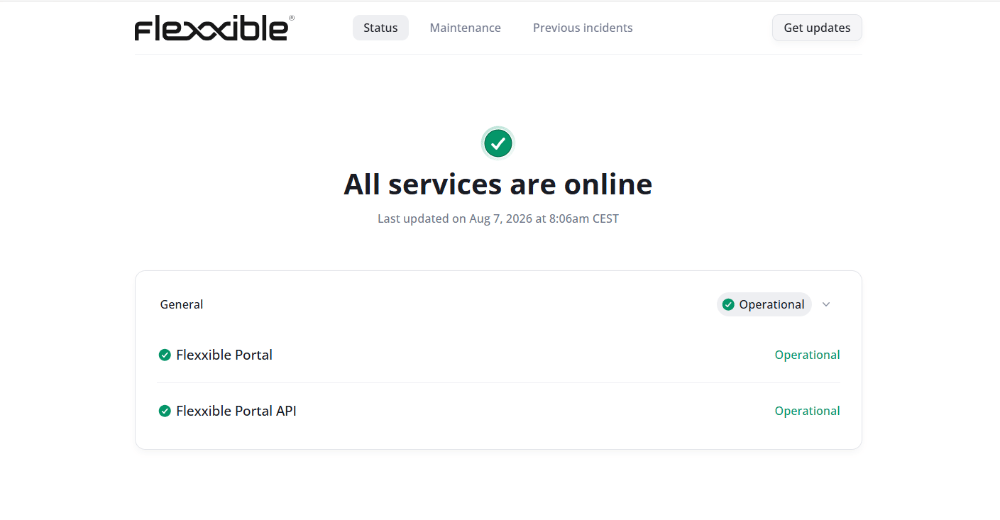
The **Status** tab shows the overall status of the monitored components:
* Flexxible Portal
* Flexxible Portal API
When all components are working correctly, the page indicates that all systems are operational. If there is an incident or a maintenance task, the overall status updates automatically to reflect the current situation.
## Maintenance
This tab shows the maintenance tasks scheduled by the Flexxible team. The information is presented in cards grouped by month, which makes it easy to review upcoming maintenance windows.
## Past incidents
In this tab you can review the history of incidents and maintenance tasks that have already been completed. Each event includes the updates published from its start to its resolution, so you can review its progress and the impact it had on the affected components. The information is organized in cards grouped by month.
## Receive notifications
The **Get updates** button lets you subscribe to notifications from [Flexxible Portal Status](https://status.portal.flexxible.com/) to receive alerts about incidents, maintenance tasks, and changes in the service status.
Notifications can be received through the following methods:
### Email
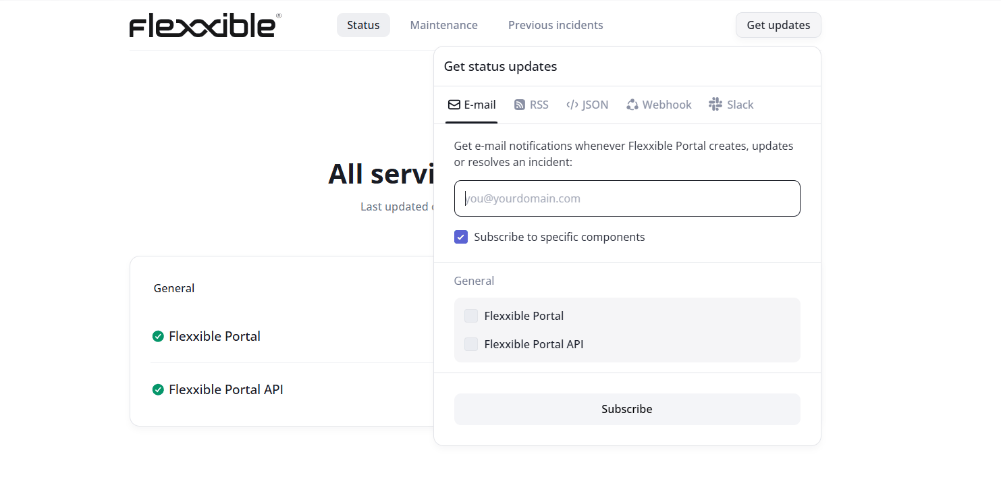
Sends email notifications when incidents, maintenance tasks, or changes in the service status occur.
Optionally, you can select **Subscribe to specific components** to receive notifications only for the selected components.
## Status
The **Status** tab shows the overall status of the monitored components:
* Flexxible Portal
* Flexxible Portal API
When all components are working correctly, the page indicates that all systems are operational. If there is an incident or a maintenance task, the overall status updates automatically to reflect the current situation.
## Maintenance
This tab shows the maintenance tasks scheduled by the Flexxible team. The information is presented in cards grouped by month, which makes it easy to review upcoming maintenance windows.
## Past incidents
In this tab you can review the history of incidents and maintenance tasks that have already been completed. Each event includes the updates published from its start to its resolution, so you can review its progress and the impact it had on the affected components. The information is organized in cards grouped by month.
## Receive notifications
The **Get updates** button lets you subscribe to notifications from [Flexxible Portal Status](https://status.portal.flexxible.com/) to receive alerts about incidents, maintenance tasks, and changes in the service status.
Notifications can be received through the following methods:
### Email
Sends email notifications when incidents, maintenance tasks, or changes in the service status occur.
Optionally, you can select **Subscribe to specific components** to receive notifications only for the selected components.
 ### RSS
Provides update feeds from [Flexxible Portal Status](https://status.portal.flexxible.com/) so you can consume them from a feed reader or integrate them with other tools.
Two formats are available:
* **RSS feed.** Feed in RSS format.
* **Atom feed.** Feed in Atom format.
Both feeds publish service status updates and can be used with any reader or application compatible with the selected format.
### JSON
Provides a data feed in JSON format with information from [Flexxible Portal Status](https://status.portal.flexxible.com/). This feed can be used to integrate the service status with applications, services, or automated processes.
### Webhook
Sends automatic notifications to a URL when an incident is created, updated, or resolved. The URL must correspond to the endpoint that will receive the HTTP requests sent by [Flexxible Portal Status](https://status.portal.flexxible.com/).
To configure the subscription:
1. Enter the URL that will receive the notifications.
2. Specify the email address linked to the subscription.
3. Confirm the email address.
Optionally, you can select **Subscribe to specific components** to receive notifications only for the selected components.
### Slack
Sends notifications about **Flexxible Portal** component incidents directly to a Slack workspace.
To configure the subscription:
1. Create a Slack webhook.
2. Enter the webhook URL in the corresponding field.
3. Confirm the email address associated with the subscription.
Optionally, you can select **Subscribe to specific components** to receive notifications only for the selected components.
### RSS
Provides update feeds from [Flexxible Portal Status](https://status.portal.flexxible.com/) so you can consume them from a feed reader or integrate them with other tools.
Two formats are available:
* **RSS feed.** Feed in RSS format.
* **Atom feed.** Feed in Atom format.
Both feeds publish service status updates and can be used with any reader or application compatible with the selected format.
### JSON
Provides a data feed in JSON format with information from [Flexxible Portal Status](https://status.portal.flexxible.com/). This feed can be used to integrate the service status with applications, services, or automated processes.
### Webhook
Sends automatic notifications to a URL when an incident is created, updated, or resolved. The URL must correspond to the endpoint that will receive the HTTP requests sent by [Flexxible Portal Status](https://status.portal.flexxible.com/).
To configure the subscription:
1. Enter the URL that will receive the notifications.
2. Specify the email address linked to the subscription.
3. Confirm the email address.
Optionally, you can select **Subscribe to specific components** to receive notifications only for the selected components.
### Slack
Sends notifications about **Flexxible Portal** component incidents directly to a Slack workspace.
To configure the subscription:
1. Create a Slack webhook.
2. Enter the webhook URL in the corresponding field.
3. Confirm the email address associated with the subscription.
Optionally, you can select **Subscribe to specific components** to receive notifications only for the selected components.